
How to Show Up on Google Maps as a Wedding Marquee in Lahore
Families search Google Maps for marquees near them. Here is how Maps ranks venues, how to complete your profile, and how to collect reviews the right way.
On this page (9) +
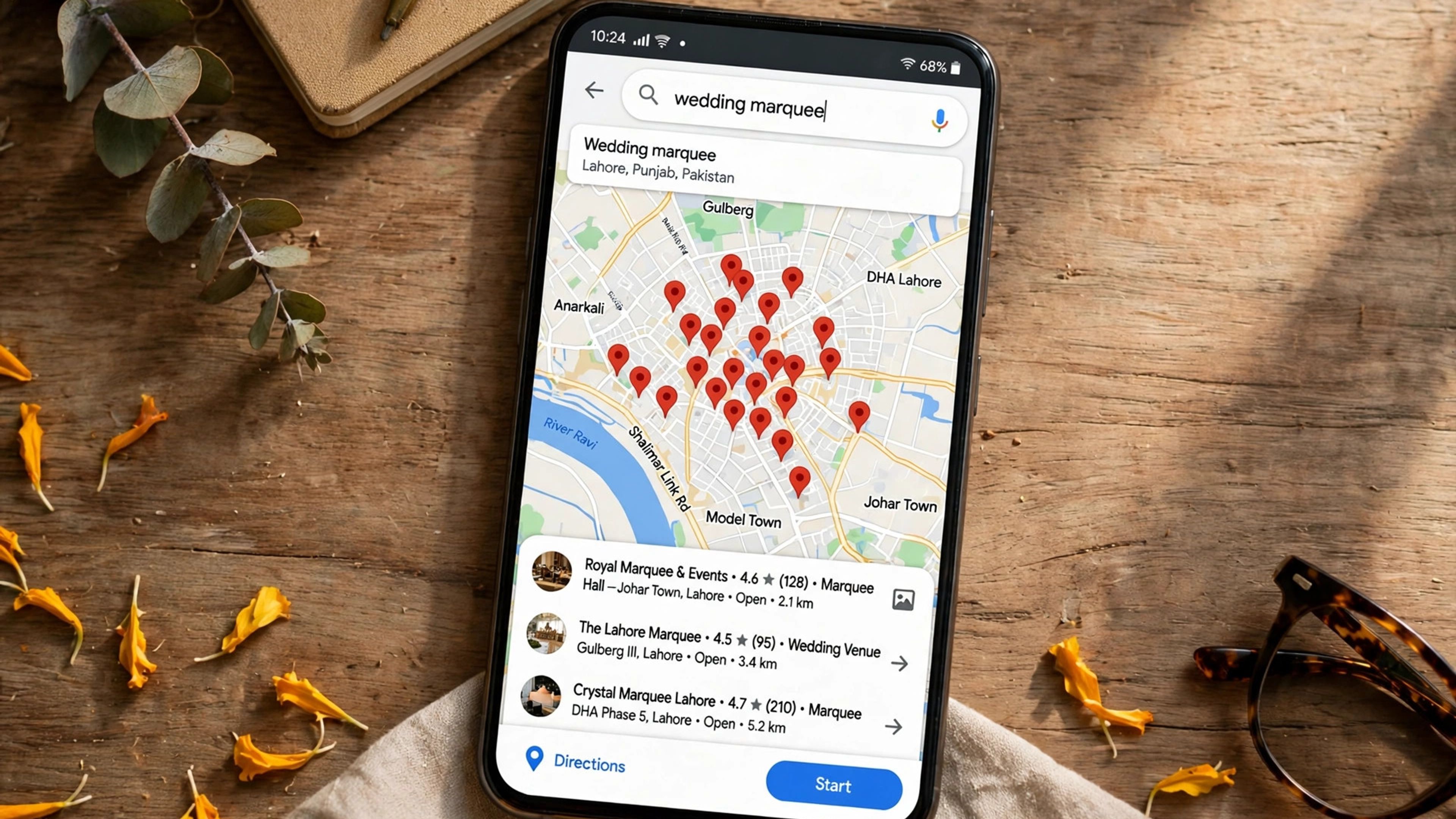
When a family wants a wedding marquee in Lahore, they often start with Google Maps. They type something like "marquee near me" or "banquet hall in DHA", look at the map, and open the ones with good photos and reviews.
This guide explains how Google Maps decides which venues to show, how to complete your Business Profile, and how to collect reviews without breaking Google's rules.
How Google Maps ranks venues
Google says local results depend on three things:
- Relevance: how well your profile matches what the person searched.
- Distance: how close your venue is to the searcher or to the area they named.
- Prominence: how well known you are, which includes reviews, links and mentions across the web.
You cannot change your distance, but you can improve relevance and prominence. Nobody can pay to rank higher in these results, and no one can promise a position.
Complete your profile first
Many marquee profiles are half finished. Fill in everything, accurately:
- Business name. Use your real name, exactly as it appears on your sign and website. Do not add "Best marquee in Lahore" or area names. Google can suspend profiles that do this.
- Categories. Choose the main category that fits best, such as a banquet hall or wedding venue, and add extra categories that are true, such as an event venue.
- Address and map pin. Check the pin is on your entrance, not down the road.
- Hours. Set real hours, and update them for holidays and events.
- Phone and website. Use the same details as your website.
- Description. Write what you offer in your own words: halls, capacity and functions. Do not stuff keywords.
- Attributes and services. Add the features that apply, such as parking and accessibility, and list functions like mehndi, barat and walima.
For a step-by-step walk-through, read our Google Business Profile setup guide for Pakistan.
Photos do the selling
On Maps, photos are the first thing a family sees. Add plenty of real ones:
- The entrance and parking.
- The hall from several angles, empty and set up.
- The stage and décor options.
- Menu displays and the buffet area.
- The bridal room and other facilities.
- A short video walk-through.
Use bright, sharp images and avoid heavy filters. Update them each season so the profile looks alive. Photos of real functions help, but only with the family's and photographer's permission.
Reviews: ask the right way
Reviews matter for ranking and for trust. Google's rules are strict about how you collect them:
Allowed: ask every client in the same way, after the function; send them a direct link; reply to every review.
Not allowed: paying or rewarding for reviews, asking only happy clients, having staff or family review, or reviewing competitors.
A short WhatsApp message after the event works well:
Assalam o Alaikum [Name], thank you for hosting your function with us. If you were happy with the experience, a short Google review would help other families find us. It takes a minute: [link]. Thank you!
Reply to every review within a couple of days. Thank people by name, and respond calmly to criticism with an offer to put it right.
Make the website match
Google compares your profile with your website. Make sure of the following:
- Your name, address and phone number are identical in both places.
- Your site has pages for your halls, functions and area.
- Your site loads quickly on phones. See what a marquee website should include.
Mistakes that hurt
- A keyword-stuffed name, which risks suspension.
- Wrong pin or address, so families cannot find you.
- Too few photos, or only old ones.
- Ignoring reviews, good or bad.
- Inconsistent details across the web.
- Expecting instant results. Maps rankings build over weeks and months.
How to track it
Your Business Profile shows how many people searched, called, asked for directions or visited your website. Check it monthly, and also search for your main phrases on a phone in Lahore. Our guide to ranking on Google in Pakistan covers the wider picture.
What Lixber does
We set up and manage Google Business Profiles for wedding marquees and banquet halls, with accurate details, a photo plan, a review process that follows Google's rules and matching pages on your website. We begin with a free 30-minute call. See our wedding marquee marketing page and our SEO service.
Frequently asked questions
How do I get my wedding marquee on Google Maps? Create and verify a Google Business Profile for your venue with the correct name, category, address and photos. You should have one profile per venue.
How do I rank higher on Google Maps in Lahore? Complete your profile, add many real photos, collect genuine reviews, keep your details consistent across the web and have a fast, clear website. Nobody can guarantee a specific position.
Can I put "wedding marquee Lahore" in my business name? No. Use your real business name only. Adding keywords or locations can lead to a suspended profile.
How many reviews do I need? There is no fixed number. Steady, genuine reviews over time matter more than a burst. Ask every client the same way and reply to each one.
Can I pay to appear at the top of Google Maps? You can run Google ads, which are marked as ads, but you cannot pay to rank higher in the normal map results.
What if there are two profiles for my marquee? Merge or remove the duplicates through Google Business Profile support. Duplicates can hurt your ranking and confuse families.
Want help with this?
Lixber can do it for you.
See how we handle seo for businesses in Pakistan, with a written plan and price after a free call.
Explore lixber.com/seo →Newsletter
One practical tip a week.
Plain-English advice for local businesses. No spam.
Written by
Rehan AliRehan Ali is a software engineer and co-founder of Lixber, a digital agency building websites, SEO and automation for service businesses.
Keep reading
All guides
Google Business Profile for Doctors in Pakistan
A Google Business Profile for doctors in Pakistan puts your clinic on Google Maps when patients search nearby. Setup, verification, reviews and ranking steps for clinics and doctors.
A Google Business Profile for doctors in Pakistan puts your clinic on Google Maps when patients search nearby. Setup, verification, reviews and ranking steps for clinics and doctors.
How to Recover a Lost Google Business Profile in Pakistan
Lost access to your Google Business Profile? This guide shows Pakistani business owners how to recover it step by step, from requesting access to appealing a suspension.
Lost access to your Google Business Profile? This guide shows Pakistani business owners how to recover it step by step, from requesting access to appealing a suspension.
Google Business Profile Verification Problems Pakistan
Google Business Profile verification problems in Pakistan usually mean a failed video, a postcard that never arrives, or a detail that does not match. Here is how to fix each one.
Google Business Profile verification problems in Pakistan usually mean a failed video, a postcard that never arrives, or a detail that does not match. Here is how to fix each one.